Collect money · Reviewed 24 October 2026
Invoices, partial payments and layby
Draft branded invoices, let customers pay in parts, and keep one purchase link with the current balance.
Create and review an invoice
- Open Invoices → New invoice, or use New invoice with AI.
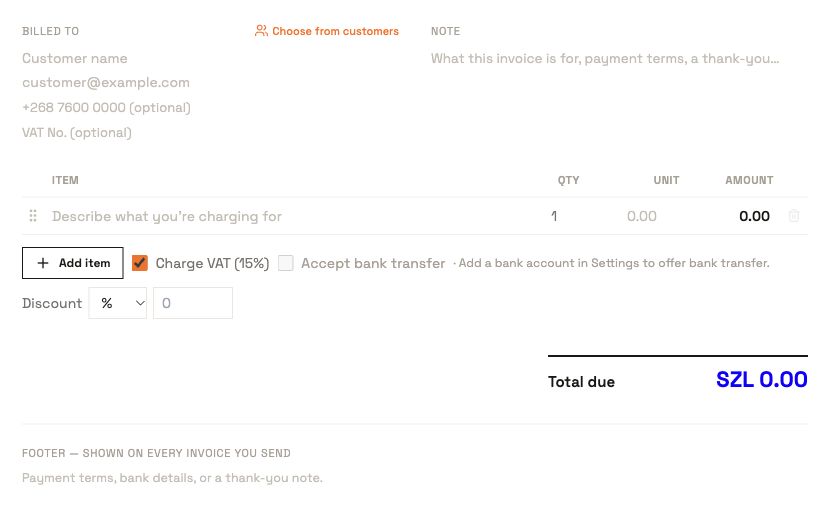
- Choose a saved customer or enter customer contact details. Add line items, quantities and unit prices, choose currency and due date, and review any discount or configured tax.
- Check the billed-to details, total, bank-transfer option and note. Use Invoice settings to configure your logo, brand, footer and tax information.
- Select Save as draft to keep it for review, or Create & send when the customer and delivery details are ready.
Set up partial payments or layby
- Open Assistant and select Partial payments, Layby payments, or Trip or event payments.
- Provide the customer, purchase and full price. Ask for one full-price invoice with partial payments enabled. Include a final date if you need one.
- Review the invoice preview. Check Allow partial payments and the full total. The final date is optional for a partial-payment invoice.
- Share the permanent invoice link after reviewing and sending. Customers return to that same link to see confirmed payments, receipts and the remaining balance.
For example, a SZL 1,000 purchase paid with SZL 300 leaves SZL 700 outstanding. A payment attempt link can expire; the permanent invoice link remains the place to inspect the purchase. A part payment does not mark the whole invoice paid.
Flexible layby lets the buyer choose payment amounts. For a fixed sequence of due dates and amounts, use scheduled billing.
Track, deliver and export
Use status filters to find drafts, sent, overdue, paid, void and awaiting-confirmation invoices. Open an invoice to inspect its payment history, PDF and purchase link. Use resend or void only after reviewing the record. Invoices can be imported from CSV as drafts or historical paid records; inspect the import result before treating it as complete.
Email and enabled WhatsApp delivery carry the invoice link. Phone-only delivery depends on a valid phone and available WhatsApp delivery. Bulk runs report each recipient’s outcome. Delivery acceptance and a customer reading the message are separate outcomes.
Use invoices in an integration
Create through POST /v1/invoices with allow_partial_payment: true. Read GET /v1/invoices/{id} for confirmed paid amount and outstanding balance. Use the returned invoice_url as the reusable purchase link.
To request a selected payment amount, use POST /v1/invoices/{id}/payment-link. Supply a positive decimal amount with at most two decimal places, no greater than the current outstanding amount. Fetch current balance again after confirmation. Public buyer data is served by GET /invoices/{id}/public.
Explore the other features
Browse all guides
- Escrow holds, releases and disputes
- Customers, CSV imports and bulk billing
- Collection channels and bank accounts
- Bank proof review and issued receipts
- Payouts, withdrawals and partial settlements
- AI assistant, voice and follow-ups
- Recurring billing, installments and subscriptions
- API keys, hosted checkout and webhooks
- Business setup, verification and security